{"activeVersionTag":"latest","latestAvailableVersionTag":"latest","collection":{"info":{"_postman_id":"903d6740-cacb-4417-9ebd-196ffc28d466","name":"First Advantage API - Developer Reference","description":"# First Advantage API\nFirst Advantage API is our latest enterprise ready API suite to access all of First Advantage Products and Services.
\n\n
\n\nThis Developer Portal includes a API Reference, Sample Code and Sandbox.\n\n
\n\n\n# Getting Started\n\nGetting started with First Advantage APIs is simple 3 step process.\n\n\n\n\n - Sign Up
\n If you are Current Customer and are supported by a Customer Success Manager (CSM) – please send an email to your CSM directly – CSM will request for an Integration Resource to help with your Implementation. \n
\n If you are Current Customer and are Supported by FADV CSSB Team – please send an email to CSSB@fadv.com. CSSB Team will request for a Integration Resource to help with your Implementation.\n
\n If you intend to become new FADV Customer – please send an email to salesmidmarket@fadv.com. The FADV Team will send an email with your Test Account and API Tokens.\n
\n - Create Background Screening Orders With the provided API key
\n We just need two things to create and process an order\n \n - Candidate Data\n
- FADV Package Information\n
\n \n - Get Notified on the status
\n There are two broad ways to know about status.\n \n - Register a webhook and FADV will send Status and Results in real-time
\n - Invoke the Order Status API
\n
\n \n
\n\n\n
\n\n# Sample Screening Work Flows\n\n## Workflow: 1-Step Screening Model\n\nOrder is immediately created when Client has and sends all Candidate information needed for FADV Screening\n\n#### Order Creation (New Screening Request) is a 2-Step Process\n\n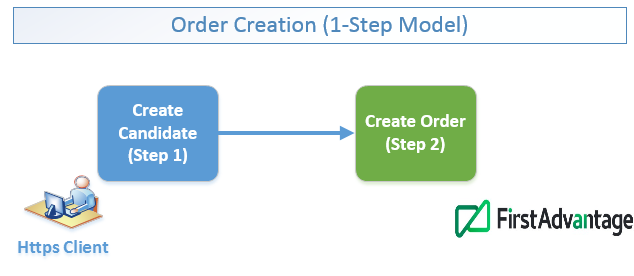\n\n - Step 1 - Create the Candidate (POST Call)
\n - Step 2 - Create the Order (POST Call Using Candidate Id from Step 1, FADV Package ID and also Optional References and Quotebacks)
\n
\nNote: FADV provides configurable options to reach out to Candidate and Requestors for Missing Information.\n\n\n#### FADV pushes Order Status and Results back to the Client’s Webhook\n\n\n\n\n## Workflow: Candidate Invite Screening Model\n\nOrder after client sends Candidate Information and Candidate is Invited to Review and Provide Missing Information required for FADV Screening \n\n#### Create Invite is a 2-Step Process\n\n\n\n\n - Step 1 - Create the Candidate (POST Call)
\n - Step 2 - Create the Candidate Invite (POST Call Using Candidate Id from Step 1, Package ID and Optional Quotebacks)
\n
\nNote:\n\nCandidate gets email from FADV - they then complete the Candidate Profile by providing consents and missing Information.\nCandidate Profiles can be from FADV Direct Advantage or Profile Advantage Platforms.\n\n#### FADV pushes Order Status and Results back to the Client’s Webhook\n\n\n\nFADV pushes Order Status and Results to the Client’s Webhook\n\n\n## Enhanced Workflow: 1-Step Screening Model with options for Report Links and Adjudication\n\n#### Create Order (New Screening Request) is still 2-Step Process with an additional Step to Check Order Status\n\n\n\n\n - Step 1 - Create the Candidate (POST Call)
\n - Step 2 - Create the Order (POST Call Using Candidate Id from Step 1, Package ID and Optional Quotebacks)
\n - Step 3 - Check Order Status (GET call)
\n
\n\n\n#### FADV pushes Order Status and Results back to the Client’s Webhook\n\n\n\nFADV pushes Order Status and Results to the Client’s Webhook.\n\n#### Client can generate a Report Link created for the Order\n\n\nNote: \nThe Report Link is a one-time use URL that takes the User directly to the Detailed Report in FADV. \nThe URL expires after a few minutes and has to generated for each use.\n\n# Sample Packages\n\n\n\n| **\\--** | **CHOICE** | **PLUS** | **PREMIUM** |\n| --- | --- | --- | --- |\n| **Package ID** | **2112** | **2113** | **2114** |\n| **Suggested Workflow** | **1-Step** | **1-Step** | **Candidate Invite** |\n| **Social Security Number Verification** | ✔ | ✔ | ✔ |\n| Confirm near-instantly that the social security number your candidate provided was validly issued and is current. | | | |\n| **National Criminal Records Search** | ✔ | ✔ | ✔ |\n| Search millions of criminal records in our proprietary United States nationwide database of criminal convictions including sex offender records from all 50 states. | | | |\n| **National Sex Offender Registry Search** | ✔ | ✔ | ✔ |\n| Search the national and state-level sex offender registries. | | | |\n| **Global Sanctions** | ✔ | ✔ | ✔ |\n| Search international terrorist lists, narcotics traffickers and other threats to national security. | | | |\n| **County Courthouse Criminal Search** | \\-- | ✔ | ✔ |\n| Search county criminal records to include an examination of Felony and Misdemeanor records where your candidate has lived, worked or attended school. | | | |\n| **Motor Vehicle Record** | \\-- | ✔ | ✔ |\n| Motor Vehicle Record | | | |\n| **Education Verification** | \\-- | \\-- | ✔ |\n| Verify educational credentials and identify potential discrepancies involving dates of attendance, course major (when available), and degree(s). | | | |\n| **Employment Verification** | \\-- | \\-- | ✔ |\n| Validate candidate’s work history and investigate unexplained gaps in employment. | | | |\n| **Required Fields for 1-Step Model**.
**Note: Candidate Invite just needs First Name, Last Name and email** | * SSN
* First Name
* Last Name
* Date of Birth
* State of Residence | * SSN
* First Name
* Last Name
* Date of Birth
* Valid City/State or County
* State of Residence
* License Number
* Valid State for License | * SSN
* First Name
* Last Name
* Date of Birth
* Valid City/State or County
* State of Residence
* License Number
* Valid State for License
* For each Institution - Required Fields
* Degree
* Institution City
* Institution State
* Institution Name
* For each Employer - Required Fields
* Employer City
* Employer State
* Employer Name
* Position |","schema":"https://schema.getpostman.com/json/collection/v2.0.0/collection.json","isPublicCollection":false,"owner":"902667","team":319436,"collectionId":"903d6740-cacb-4417-9ebd-196ffc28d466","publishedId":"2sBYHaNwsv","public":true,"publicUrl":"https://apidocs.api.us.int.sterlingcheck.app","privateUrl":"https://go.postman.co/documentation/902667-903d6740-cacb-4417-9ebd-196ffc28d466","customColor":{"top-bar":"FFFFFF","right-sidebar":"303030","highlight":"FF6C37"},"documentationLayout":"classic-double-column","customisation":{"metaTags":[{"name":"description","value":""},{"name":"title","value":""}],"appearance":{"default":"light","themes":[{"name":"dark","logo":null,"colors":{"top-bar":"212121","right-sidebar":"303030","highlight":"FF6C37"}},{"name":"light","logo":null,"colors":{"top-bar":"FFFFFF","right-sidebar":"303030","highlight":"FF6C37"}}]}},"version":"8.12.12","publishDate":"2026-11-12T19:30:49.000Z","activeVersionTag":"latest","documentationTheme":"light","metaTags":{"title":"","description":""},"logos":{"logoLight":null,"logoDark":null}},"statusCode":200},"environments":[],"user":{"authenticated":false,"permissions":{"publish":false}},"run":{"button":{"js":"https://run.pstmn.io/button.js","css":"https://run.pstmn.io/button.css"}},"web":"https://www.getpostman.com/","team":{"logo":"https://postman-image-service.postman.com/api/cloudinary-proxy/postman/image/upload/t_team_logo_pubdoc/v1/team/821597f2e346e2cd87279687884179b76d9d414de12b17edfea3bf2ac90f0fbf","favicon":"https://res.cloudinary.com/postman/image/upload/v1773163808/team/516bf54cd0b68022526d06b3f9ad2bcb.ico"},"isEnvFetchError":false,"languages":"[{\"key\":\"csharp\",\"label\":\"C#\",\"variant\":\"HttpClient\"},{\"key\":\"csharp\",\"label\":\"C#\",\"variant\":\"RestSharp\"},{\"key\":\"curl\",\"label\":\"cURL\",\"variant\":\"cURL\"},{\"key\":\"dart\",\"label\":\"Dart\",\"variant\":\"http\"},{\"key\":\"go\",\"label\":\"Go\",\"variant\":\"Native\"},{\"key\":\"http\",\"label\":\"HTTP\",\"variant\":\"HTTP\"},{\"key\":\"java\",\"label\":\"Java\",\"variant\":\"OkHttp\"},{\"key\":\"java\",\"label\":\"Java\",\"variant\":\"Unirest\"},{\"key\":\"javascript\",\"label\":\"JavaScript\",\"variant\":\"Fetch\"},{\"key\":\"javascript\",\"label\":\"JavaScript\",\"variant\":\"jQuery\"},{\"key\":\"javascript\",\"label\":\"JavaScript\",\"variant\":\"XHR\"},{\"key\":\"c\",\"label\":\"C\",\"variant\":\"libcurl\"},{\"key\":\"nodejs\",\"label\":\"NodeJs\",\"variant\":\"Axios\"},{\"key\":\"nodejs\",\"label\":\"NodeJs\",\"variant\":\"Native\"},{\"key\":\"nodejs\",\"label\":\"NodeJs\",\"variant\":\"Request\"},{\"key\":\"nodejs\",\"label\":\"NodeJs\",\"variant\":\"Unirest\"},{\"key\":\"objective-c\",\"label\":\"Objective-C\",\"variant\":\"NSURLSession\"},{\"key\":\"ocaml\",\"label\":\"OCaml\",\"variant\":\"Cohttp\"},{\"key\":\"php\",\"label\":\"PHP\",\"variant\":\"cURL\"},{\"key\":\"php\",\"label\":\"PHP\",\"variant\":\"Guzzle\"},{\"key\":\"php\",\"label\":\"PHP\",\"variant\":\"HTTP_Request2\"},{\"key\":\"php\",\"label\":\"PHP\",\"variant\":\"pecl_http\"},{\"key\":\"powershell\",\"label\":\"PowerShell\",\"variant\":\"RestMethod\"},{\"key\":\"python\",\"label\":\"Python\",\"variant\":\"http.client\"},{\"key\":\"python\",\"label\":\"Python\",\"variant\":\"Requests\"},{\"key\":\"r\",\"label\":\"R\",\"variant\":\"httr\"},{\"key\":\"r\",\"label\":\"R\",\"variant\":\"RCurl\"},{\"key\":\"ruby\",\"label\":\"Ruby\",\"variant\":\"Net::HTTP\"},{\"key\":\"shell\",\"label\":\"Shell\",\"variant\":\"Httpie\"},{\"key\":\"shell\",\"label\":\"Shell\",\"variant\":\"wget\"},{\"key\":\"swift\",\"label\":\"Swift\",\"variant\":\"URLSession\"}]","languageSettings":[{"key":"csharp","label":"C#","variant":"HttpClient"},{"key":"csharp","label":"C#","variant":"RestSharp"},{"key":"curl","label":"cURL","variant":"cURL"},{"key":"dart","label":"Dart","variant":"http"},{"key":"go","label":"Go","variant":"Native"},{"key":"http","label":"HTTP","variant":"HTTP"},{"key":"java","label":"Java","variant":"OkHttp"},{"key":"java","label":"Java","variant":"Unirest"},{"key":"javascript","label":"JavaScript","variant":"Fetch"},{"key":"javascript","label":"JavaScript","variant":"jQuery"},{"key":"javascript","label":"JavaScript","variant":"XHR"},{"key":"c","label":"C","variant":"libcurl"},{"key":"nodejs","label":"NodeJs","variant":"Axios"},{"key":"nodejs","label":"NodeJs","variant":"Native"},{"key":"nodejs","label":"NodeJs","variant":"Request"},{"key":"nodejs","label":"NodeJs","variant":"Unirest"},{"key":"objective-c","label":"Objective-C","variant":"NSURLSession"},{"key":"ocaml","label":"OCaml","variant":"Cohttp"},{"key":"php","label":"PHP","variant":"cURL"},{"key":"php","label":"PHP","variant":"Guzzle"},{"key":"php","label":"PHP","variant":"HTTP_Request2"},{"key":"php","label":"PHP","variant":"pecl_http"},{"key":"powershell","label":"PowerShell","variant":"RestMethod"},{"key":"python","label":"Python","variant":"http.client"},{"key":"python","label":"Python","variant":"Requests"},{"key":"r","label":"R","variant":"httr"},{"key":"r","label":"R","variant":"RCurl"},{"key":"ruby","label":"Ruby","variant":"Net::HTTP"},{"key":"shell","label":"Shell","variant":"Httpie"},{"key":"shell","label":"Shell","variant":"wget"},{"key":"swift","label":"Swift","variant":"URLSession"}],"languageOptions":[{"label":"C# - HttpClient","value":"csharp - HttpClient - C#"},{"label":"C# - RestSharp","value":"csharp - RestSharp - C#"},{"label":"cURL - cURL","value":"curl - cURL - cURL"},{"label":"Dart - http","value":"dart - http - Dart"},{"label":"Go - Native","value":"go - Native - Go"},{"label":"HTTP - HTTP","value":"http - HTTP - HTTP"},{"label":"Java - OkHttp","value":"java - OkHttp - Java"},{"label":"Java - Unirest","value":"java - Unirest - Java"},{"label":"JavaScript - Fetch","value":"javascript - Fetch - JavaScript"},{"label":"JavaScript - jQuery","value":"javascript - jQuery - JavaScript"},{"label":"JavaScript - XHR","value":"javascript - XHR - JavaScript"},{"label":"C - libcurl","value":"c - libcurl - C"},{"label":"NodeJs - Axios","value":"nodejs - Axios - NodeJs"},{"label":"NodeJs - Native","value":"nodejs - Native - NodeJs"},{"label":"NodeJs - Request","value":"nodejs - Request - NodeJs"},{"label":"NodeJs - Unirest","value":"nodejs - Unirest - NodeJs"},{"label":"Objective-C - NSURLSession","value":"objective-c - NSURLSession - Objective-C"},{"label":"OCaml - Cohttp","value":"ocaml - Cohttp - OCaml"},{"label":"PHP - cURL","value":"php - cURL - PHP"},{"label":"PHP - Guzzle","value":"php - Guzzle - PHP"},{"label":"PHP - HTTP_Request2","value":"php - HTTP_Request2 - PHP"},{"label":"PHP - pecl_http","value":"php - pecl_http - PHP"},{"label":"PowerShell - RestMethod","value":"powershell - RestMethod - PowerShell"},{"label":"Python - http.client","value":"python - http.client - Python"},{"label":"Python - Requests","value":"python - Requests - Python"},{"label":"R - httr","value":"r - httr - R"},{"label":"R - RCurl","value":"r - RCurl - R"},{"label":"Ruby - Net::HTTP","value":"ruby - Net::HTTP - Ruby"},{"label":"Shell - Httpie","value":"shell - Httpie - Shell"},{"label":"Shell - wget","value":"shell - wget - Shell"},{"label":"Swift - URLSession","value":"swift - URLSession - Swift"}],"layoutOptions":[{"value":"classic-single-column","label":"Single Column"},{"value":"classic-double-column","label":"Double Column"}],"versionOptions":[],"environmentOptions":[{"value":"0","label":"No Environment"}],"canonicalUrl":"https://apidocs.api.us.int.sterlingcheck.app/view/metadata/2sBYHaNwsv"}